
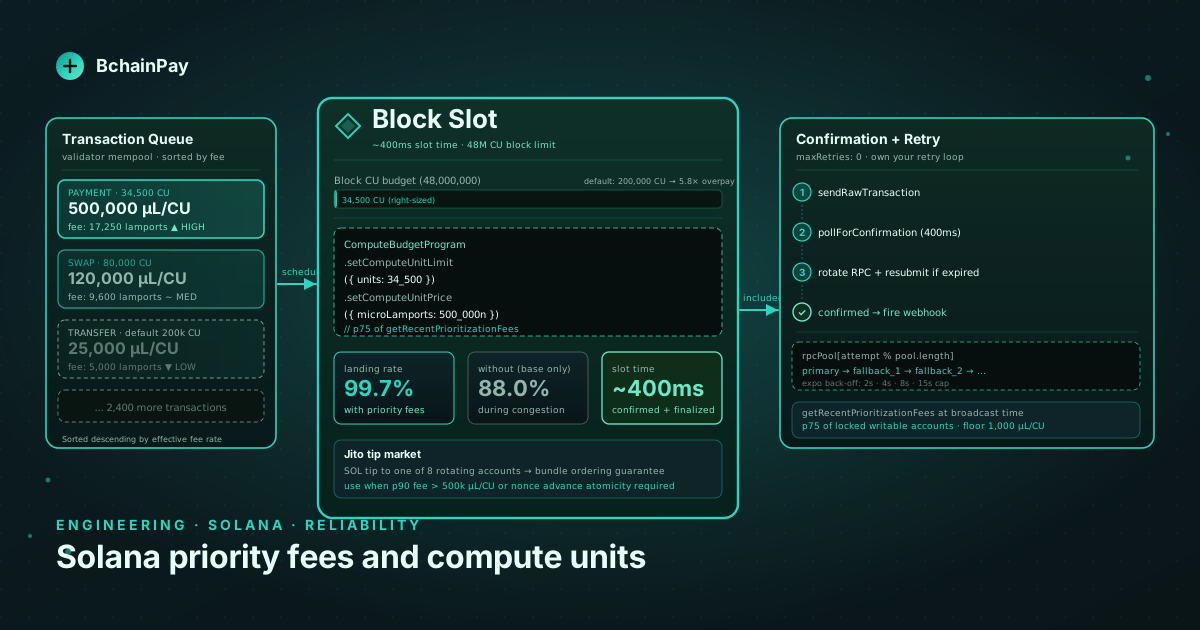
A Solana payment transaction that fails to land is not an edge case — it is a predictable operational event, and every merchant accepting USDC on Solana will encounter it. When the network is congested, the base fee of 5,000 lamports per signature does not reflect the actual cost to get your transaction processed. Validators sort transactions by their effective fee rate; if yours is at the bottom of the queue, it expires after 150 slots (approximately 60 seconds) without ever being included in a block.
We learned this the hard way. During a peak-traffic event in late 2025, about 12% of BchainPay's Solana payment transactions stalled and timed out. Every one of them required a manual re-submit. This post documents what we changed to cut that figure to under 0.3%: compute unit right-sizing, percentile-based priority fee estimation, selective Jito tip usage, and a retry scheduler that owns its own resubmission policy.
How Solana transaction fees work#
Every transaction on Solana consumes some amount of compute units (CUs) —
roughly analogous to EVM gas. The base fee is 5,000 lamports × number of signatures regardless of compute usage. The priority fee is an additional
charge expressed as micro-lamports per compute unit and set by you, the
transaction author:
import { ComputeBudgetProgram } from '@solana/web3.js';

// Set a priority fee of 50,000 micro-lamports per CU
const priorityFeeIx = ComputeBudgetProgram.setComputeUnitPrice({
  microLamports: 50_000,
});
The total priority fee you pay = priorityFee × CUs_consumed / 1_000_000
lamports. At 50,000 micro-lamports and 50,000 CUs consumed, that is 2,500
lamports — about $0.0004 at current prices. Small, but multiplied across
thousands of transactions and competitive bidding, it determines which
transactions validators schedule first.
There is a second budget instruction you must understand: setComputeUnitLimit.
By default, every transaction is allocated 200,000 CUs. Your priority fee
is computed against this ceiling even if your transaction only consumes 30,000
CUs. If you set a unit price of 50,000 micro-lamports and never set a unit
limit, validators see you bidding 10,000,000 micro-lamports total — but you
only needed 1,500,000. The rest is wasted cost.
Right-sizing the compute unit limit#
Before you can set a tight limit, you need to know your actual CU usage. Simulate the transaction first:
import {
  Connection, Transaction, PublicKey,
} from '@solana/web3.js';
import {
  createTransferCheckedInstruction, getAssociatedTokenAddress,
} from '@solana/spl-token';

async function measureCUs(
  conn: Connection,
  tx: Transaction,
): Promise<number> {
  const sim = await conn.simulateTransaction(tx, {
    commitment: 'processed',
    replaceRecentBlockhash: true,
  });
  if (sim.value.err) throw new Error(JSON.stringify(sim.value.err));
  return sim.value.unitsConsumed ?? 200_000;
}
In practice, a plain SPL USDC transfer uses about 30,000 CUs. A transfer that creates a new Associated Token Account (ATA) for the recipient adds roughly 17,000 more. Build a small lookup table for your transaction types:
| Transaction type | Typical CU usage |
|---|---|
| SPL transfer (warm ATA) | ~30,000 |
| SPL transfer + create recipient ATA | ~47,000 |
| SPL transfer + durable nonce advance | ~35,000 |
| USDC transfer via Token-2022 | ~36,000 |
Set the limit to measured + 15% buffer. Never set it lower than measured,
because occasional slot-level variance can push actual usage up slightly:
const raw = await measureCUs(conn, baseTx);
const limit = Math.ceil(raw * 1.15);

baseTx.add(
  ComputeBudgetProgram.setComputeUnitLimit({ units: limit }),
  ComputeBudgetProgram.setComputeUnitPrice({ microLamports: feeEstimate }),
);
With a tight CU limit, your effective bid (total micro-lamports) becomes predictable, and you stop overpaying on low-priority transactions.
Estimating the right priority fee#
The getRecentPrioritizationFees RPC method returns the per-slot priority
fees paid by transactions that landed in recent blocks, filtered by a list
of accounts your transaction touches:
async function estimatePriorityFee(
  conn: Connection,
  accounts: PublicKey[],
  percentile: number = 75,
): Promise<bigint> {
  const fees = await conn.getRecentPrioritizationFees({ lockedWritableAccounts: accounts });
  if (fees.length === 0) return 1_000n; // fallback: 1,000 µL/CU

  const sorted = fees
    .map(f => f.prioritizationFee)
    .sort((a, b) => a - b);

  const idx = Math.min(
    Math.floor((percentile / 100) * sorted.length),
    sorted.length - 1,
  );
  return BigInt(sorted[idx]);
}
Pass the writable accounts that your transaction touches — primarily the source and destination ATAs plus the token mint. The RPC scans recent slots for transactions that wrote to those same accounts and returns the fees that got included. Using the 75th percentile lands the vast majority of transactions quickly without paying the spikes caused by NFT mints or protocol liquidations competing for the same slots.
One important gotcha: getRecentPrioritizationFees returns zeros during
quiet periods. A zero-fee transaction lands fine when the network is idle.
Detect this condition and use a small non-zero floor (1,000 micro-lamports)
to stay out of the dust:
const estimate = await estimatePriorityFee(conn, accounts);
const microLamports = estimate < 1_000n ? 1_000n : estimate;
We run this estimation at transaction build time, not at a fixed interval. A cached fee from 30 seconds ago can be stale if a major dApp event hits.
The Jito tip market#
Jito Labs runs a separate MEV-aware validator client that the majority of Solana stake weight runs today. Jito adds a parallel fee market: you can tip the Jito block engine to get bundle-level transaction ordering, which is distinct from the standard priority fee. For payment transactions where you need strict ordering (e.g., a nonce advance must precede the SPL transfer), Jito bundles guarantee atomicity and ordering at the validator layer, not just at the EVM-equivalent level.
The tip is a SOL transfer to one of eight rotating tip accounts:
const JITO_TIP_ACCOUNTS = [
  '96gYZGLnJYVFmbjzopPSU6QiEV5fGqZNyN9nmNhvrZU5',
  'HFqU5x63VTqvQss8hp11i4wVV8bD44PvwucfZ2bU7gRe',
  // ... 6 more; fetch the live list from Jito's API
];

const tipAccount = new PublicKey(
  JITO_TIP_ACCOUNTS[Math.floor(Math.random() * JITO_TIP_ACCOUNTS.length)],
);

const tipIx = SystemProgram.transfer({
  fromPubkey: feePayer,
  toPubkey: tipAccount,
  lamports: 10_000n, // ~$0.002 at current prices
});
We use Jito selectively, not universally. For standard one-off USDC checkouts, the standard priority fee is sufficient and cheaper. We route to Jito when:
- The
getRecentPrioritizationFees90th percentile is above 500,000 micro-lamports (indicating an active spike). - The transaction includes a durable nonce advance that must precede the SPL transfer (atomicity matters).
- The amount is above $500 (the extra $0.002 tip cost is negligible).
Retry strategy#
With priority fees and CU limits set correctly, most transactions land on the first or second attempt. The cases that don't are: a sudden fee spike between estimate-time and landing-time, or an RPC node that is slightly behind the leader and submits too late. A retry scheduler handles both:
async function submitWithRetry(
  conn: Connection,
  rawTx: Uint8Array,
  signature: string,
  maxAttempts = 8,
): Promise<void> {
  let attempt = 0;

  while (attempt < maxAttempts) {
    await conn.sendRawTransaction(rawTx, {
      skipPreflight: false,
      maxRetries: 0,        // we control retries
    });

    // Poll for confirmation with 2s back-off between checks
    const confirmed = await pollForConfirmation(conn, signature, 10_000);
    if (confirmed) return;

    attempt++;
    // Exponential back-off: 2s, 4s, 8s … capped at 15s
    await sleep(Math.min(2_000 * 2 ** attempt, 15_000));
  }

  throw new TransactionExpiredError(signature);
}

async function pollForConfirmation(
  conn: Connection,
  sig: string,
  timeoutMs: number,
): Promise<boolean> {
  const deadline = Date.now() + timeoutMs;
  while (Date.now() < deadline) {
    const status = await conn.getSignatureStatus(sig, {
      searchTransactionHistory: false,
    });
    if (status.value?.confirmationStatus === 'confirmed') return true;
    if (status.value?.err) throw new SolanaTransactionError(status.value.err);
    await sleep(400);
  }
  return false;
}
Three design choices worth explaining:
maxRetries: 0 is non-negotiable. The default RPC retry behavior varies
across providers and can result in a stale transaction being resubmitted after
the nonce has already advanced, producing a confusing error. Own the retry
loop explicitly.
Do not rebuild the transaction on retry. The transaction bytes are stable (signed by the shopper already, with a durable nonce). You are just re-broadcasting the same bytes to different RPC endpoints. Rebuilding would require a new signature from the shopper.
Switch RPC on retry. If an attempt times out, the next attempt should go to a different RPC node. A single node that is behind the cluster will fail indefinitely. Maintain a pool of 2-3 RPC endpoints and round-robin across them on retry:
const rpcPool = [process.env.RPC_PRIMARY!, process.env.RPC_FALLBACK_1!, process.env.RPC_FALLBACK_2!];
const conn = new Connection(rpcPool[attempt % rpcPool.length]);
BchainPay Solana payment handling#
BchainPay handles all of the above automatically for Solana payment intents. When a merchant creates an intent, our infrastructure:
- Simulates the transaction and records the CU usage.
- Calls
getRecentPrioritizationFeesfor the relevant ATAs. - Adds
setComputeUnitLimitandsetComputeUnitPriceinstructions to the serialized transaction before handing it to the shopper's wallet. - Routes to Jito when the 90th-percentile fee is elevated.
- Manages the retry loop server-side after the shopper submits their signature.
Merchants see a single webhook per outcome:
POST /v1/payment_intents
Authorization: Bearer sk_live_…
Content-Type: application/json

{
  "chain": "solana",
  "token": "USDC",
  "amount": "49.99",
  "idempotency_key": "order_9182736"
}
{
"id": "pi_01HXV…",
"status": "pending",
"chain": "solana",
"token": "USDC",
"amount": "49.99",
"fee_estimate_lamports": 3850,
"priority_fee_microlamports": 42000,
"compute_unit_limit": 34500
}The fee_estimate_lamports field lets merchants show users the estimated
network cost before they sign. The priority fee and compute unit limit are
recomputed every time the intent moves to the broadcast phase, so a shopper
who takes 90 seconds to confirm gets a fresh estimate rather than a stale one
from intent creation.
Key takeaways#
- The 200,000 CU default allocation makes your effective priority bid 6-7×
larger than it needs to be. Simulate every transaction type and set a tight
setComputeUnitLimitwith a 15% buffer. - Estimate priority fees from
getRecentPrioritizationFeesat broadcast time (not at a fixed cache interval) using the accounts your transaction writes. Use the 75th percentile and a 1,000 micro-lamport floor. - Reserve Jito tips for high-value transactions or fee spikes above 500,000 micro-lamports; the standard priority market is sufficient the rest of the time.
- Set
maxRetries: 0and own your retry loop. Rotate RPC endpoints on retry; a single lagging node will fail every attempt. - Do not rebuild a shopper-signed transaction on retry. Rebroadcast the same bytes and let the durable nonce protect against replay if the intent is ultimately abandoned.
- With right-sized CUs and fresh fee estimates, Solana payment transaction landing rates above 99.7% are achievable in production, even during sustained network congestion.